Online ordering
Online ordering for your restaurant, on your own site
An online ordering system for restaurants should take a guest from menu to paid in a few taps, with no app and no account. pickup.kitchen does that on yourname.pickup.kitchen, and lists you on pickup.kitchen so people nearby can find you. Every paid order lands on your kitchen screen with a sound.
- No app to install, no account before checkout
- Time slots close when full, and the day can sell out
- Free onboarding, no monthly fee, 10% per order
Free onboarding. Pay as you use. No monthly fee for ordering.
Real screens
See it in the app
Real screens from pickup.kitchen, the same ones you and your guests use.
1Your guests
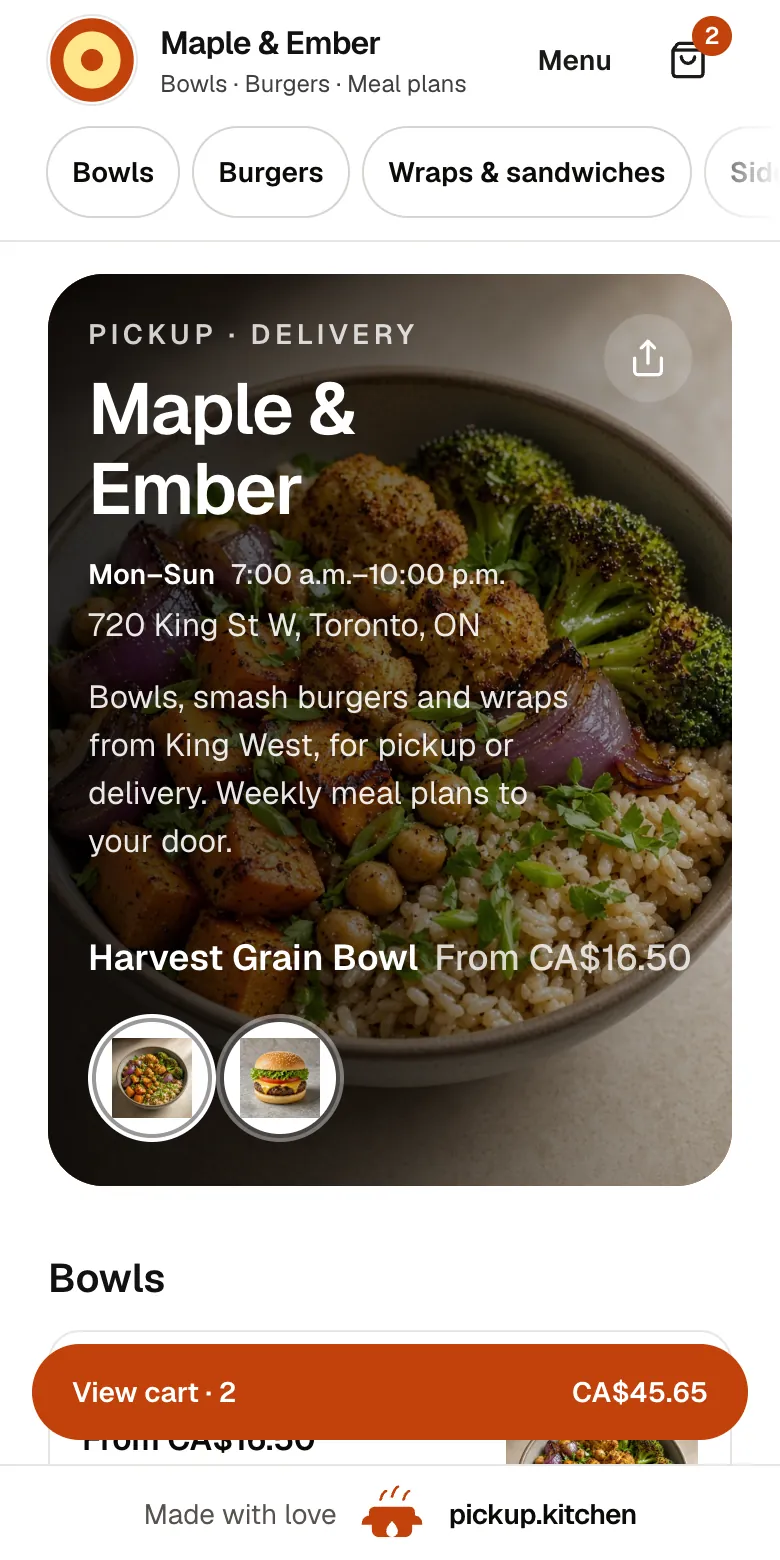
Your menu, on your own site
yourname.pickup.kitchen shows your dishes with photos and prices, and each guest picks pickup or delivery.
2Your guests
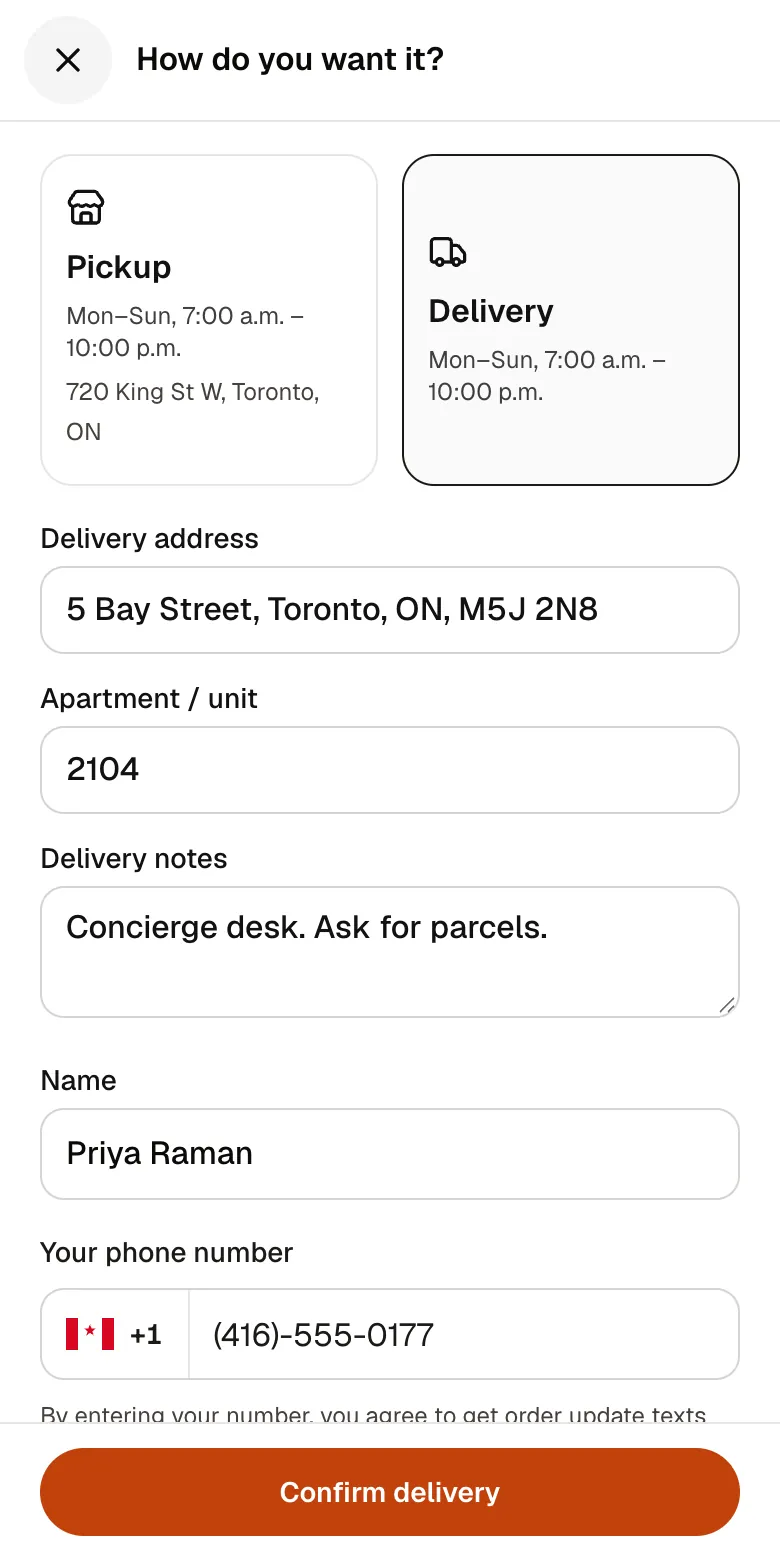
A checkout that takes seconds
A pickup time or a delivery address, then pay by card. No app to install and no account before paying.
3Your guests
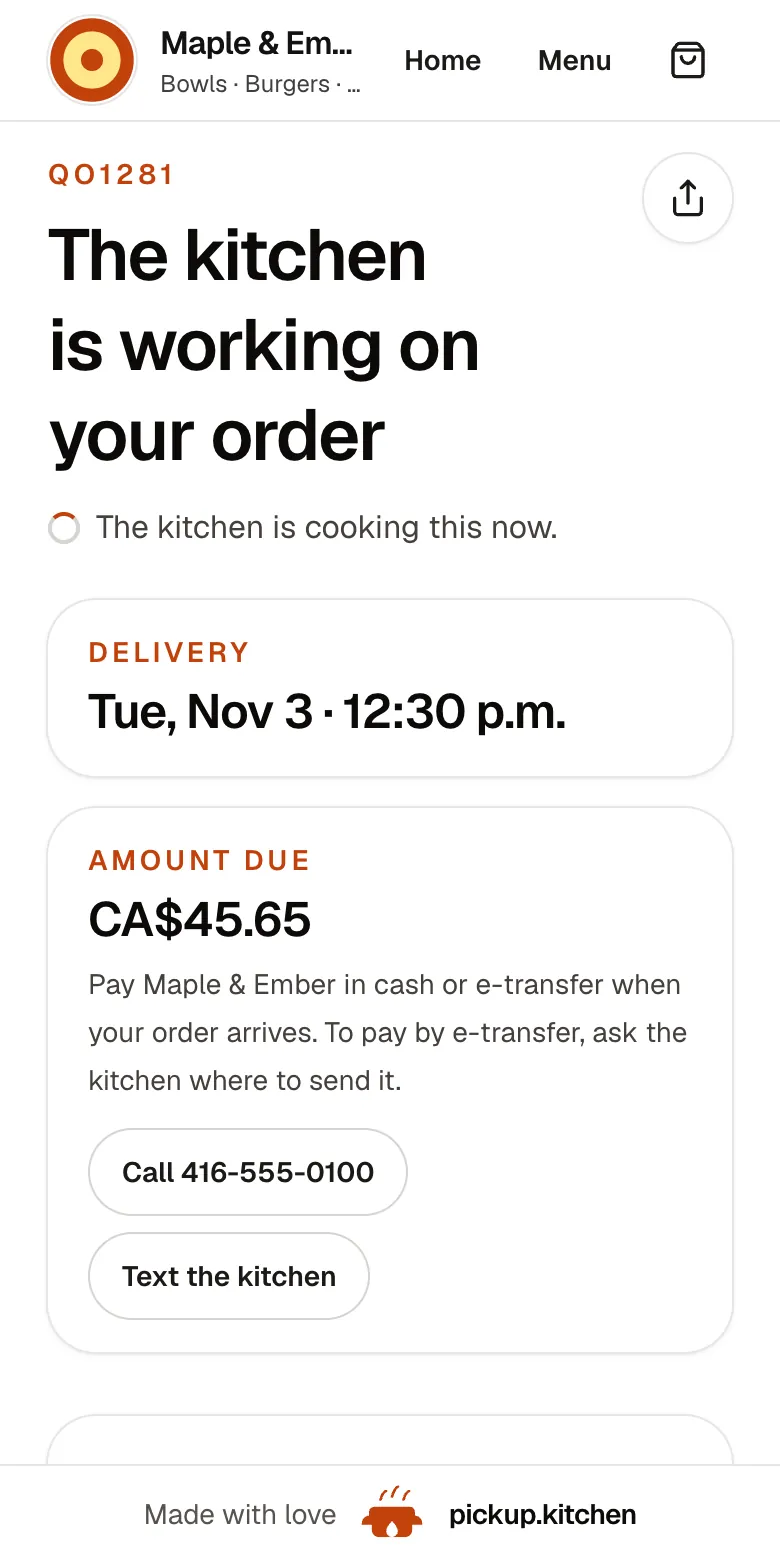
Every order gets a QO number
The guest sees their order number the moment they order, and the same number is on the kitchen's ticket.
4Your kitchen
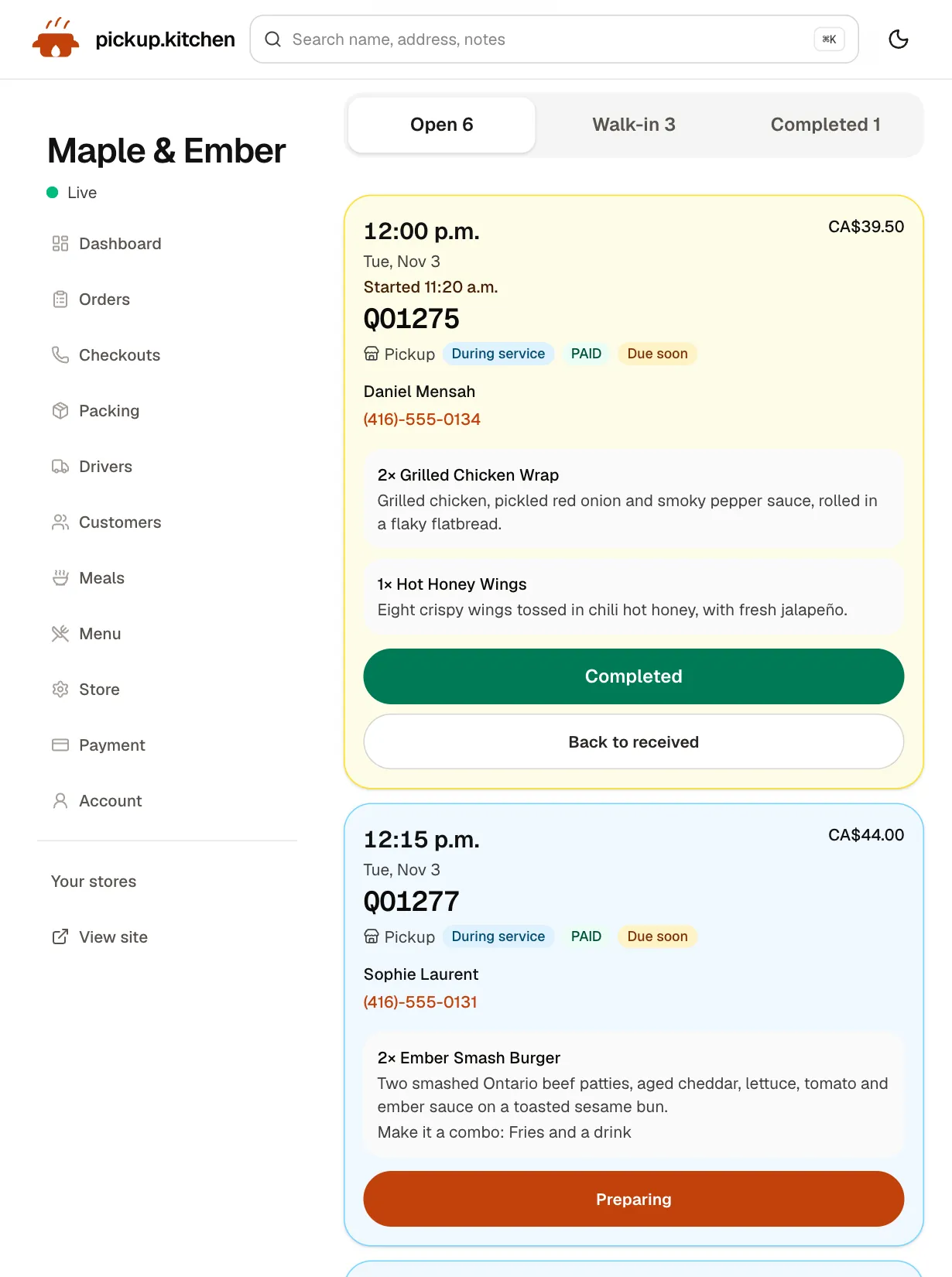
Tickets on the kitchen screen
Online orders, walk-ins and finished tickets in their own lanes, each with its QO number and the time it is due.
See how it works
In one login
What you get
- Your own siteyourname.pickup.kitchen with your menu, photos, hours, and checkout on one page.
- Menu with optionsDishes, sizes, add-ons, and a note field the cook sees on the ticket.
- Time slotsSlot length, orders per slot, cutoff, closed dates, and sold-out days.
- Kitchen screenNew tickets arrive with a sound. The cook starts them and completes them.
- Order updatesGuests get an order page, an email, and optional texts from confirmed to ready.
- Customer listEvery guest is saved with their orders, ready for your next email.
What your guest does
They open your link, tap a dish, pick options, and leave a note for the kitchen such as “no onions”. They choose pickup or delivery, whichever you offer, pick a time, and pay by card.
There is no app to download and no account to create first. Their name and phone stay with you for the next order.
After paying, the guest gets an order page and an email. They are told when the order is confirmed, and again when it is “Ready for pickup” or “On the way”. If they agreed to texts at checkout, the same updates arrive by text.
Pickup, delivery, or both
Switch delivery on and guests choose pickup or delivery at checkout. For delivery they enter an address and pick a slot.
Delivery drops go to your drivers through the delivery tools: routes, the driver app, and a photo at the door. If you do not deliver, leave delivery off and nothing about the site changes.
Order now, or for another day
Guests can book the next open days, not only tonight. They pick a day and a time, and days that are closed or past their cutoff do not show. That is how a bakery takes Saturday's pre-orders on Wednesday, and how a meal-prep kitchen fills next week.
If today's slots have all passed, checkout moves the guest to the next open day and says why.
Times you can keep at the 6 p.m. rush
Online ordering goes wrong when the site promises more than the kitchen can cook. So you set the limits yourself.
Each open day has its own hours. Pick a slot length from 10 minutes to an hour, and say how many orders one slot holds. When a slot is full, it closes on the site.
- Order cutoff: stop taking orders for a day at a time you choose, such as 8 p.m. the night before.
- Sold out today: one tap and nobody can book today. Tomorrow stays open.
- Closed dates: mark a holiday or a week away, and those days disappear from checkout.
- Orders you enter yourself at the counter are not blocked by the cutoff.
Where the orders go
Each paid order becomes a ticket on the kitchen screen. A chime plays and the screen says “New order received”. If you turn on notifications, a locked phone buzzes too.
The cook taps Preparing when they start and Completed when it is done. Completing the ticket is what tells the guest it is ready. Tickets turn amber when due soon and red when late.
The same screen holds walk-in orders from your counter, so nothing lives on a second system. See the kitchen display system page for the full screen.
A site that looks like you
Your site shows your name, logo, address, hours, and dish photos, with vegetarian and non-vegetarian marks where they apply. There are buttons to call or text the kitchen for questions the menu cannot answer.
Share the link on Instagram or Facebook. Jinal Patel of The Cheesey District says: “Someone taps our Instagram and the site is already open to order.” Guests go straight from the post to the menu.
You also get a free listing on pickup.kitchen. People nearby find you there, then order on your own site. If you own a domain, we can point it at your site.
What 10% per order keeps in your pocket
In Canada, Uber Eats lists 20%, 25% or 30% on delivery orders, depending on the plan. DoorDash lists 20%, 25% or 29% (both checked November 2026). On a $40 delivery order at 30%, that is $12 gone.
pickup.kitchen charges 10% per order and no monthly fee. On card orders your menu shows each price with the 10% already in it, and the customer pays it at checkout. So the price you set is the price you keep, before Stripe's own card processing fee.
Payments go to your own Stripe account. Past customers stay on your list, so you can reach them again without paying someone for the introduction.
Sell meal plans on the same site
If you also pack weekly boxes, a meal plan can sit on the same menu as tonight's plates. A plan has a start date, an end date, and the days you pack. Guests pay once, and you get the morning list and the labels. See the meal prep software page for how skips and pauses work.
Check it before you publish
Place a test order from your own phone. Watch the ticket arrive with its sound. Mark it Preparing and Completed, and read the email and order page your guest gets. Then check the slot you booked on the board, and cancel the test.
Step by step
How to get started
- 1Step 1: Create your accountName your kitchen and pick your address. Your site goes up at yourname.pickup.kitchen.
- 2Step 2: Add your menuSend a photo of your menu or paste the text, then check each dish and price.
- 3Step 3: Set your hours and slotsChoose open days, slot length, orders per slot, and a cutoff if you want one.
- 4Step 4: Connect Stripe and go liveConnect Stripe to take card payments, then switch the store live.
- 5Step 5: Share your linkPut it in your Instagram bio and on your door. Orders arrive on the kitchen screen.
FAQ
Questions
Is there a free online ordering system for restaurants?
Onboarding is free, listing is free, and there is no monthly fee. You pay 10% per order. On card orders the guest pays that 10% at checkout.
Do guests need an app or an account?
No. They order in the browser and can pay without creating an account. Their name and phone are saved for next time.
GloriaFood is shutting down. What can I use instead?
GloriaFood says it ends on April 30, 2027 (checked November 2026). pickup.kitchen is a free-to-start alternative: your own site, kitchen screen, and customer list, with no monthly fee and 10% per order. Send us your menu and we load it.
What is the best online ordering system for restaurants?
The one your guests finish and your cook can keep up with. Check four things. Checkout needs no app. Slots close when full. A ticket reaches the kitchen screen. There is no per-order cut of 15% or more.
Can I stop orders when the kitchen is full?
Yes. Slots close when they reach your limit. You can mark the whole day sold out. You can set a cutoff so late orders never arrive.
Is there a restaurant online ordering system in Canada and the US?
Yes. pickup.kitchen is based in Toronto and serves restaurants in Canada and the United States, with card payments through Stripe.
Keep reading
- ProductRestaurant website builder with orderingA restaurant website builder where the menu is the checkout. Get yourname.pickup.kitchen with photos, hours, and ordering. Free onboarding, 10% per order.
- ProductKitchen display system for restaurantsA kitchen display system that runs in the browser: tickets arrive with a sound, cooks tap Preparing and Completed, and guests hear when it is ready.
- ProductRestaurant POS systemsRestaurant POS systems differ. This one takes walk-in and phone orders on your online menu and sends them to your kitchen screen. No hardware to buy.
- Productpickup.kitchen pricing: 10% per order, no monthly feepickup.kitchen pricing: free onboarding, no monthly fee, 10% per order. Delivery tools come with ordering. The driver app on its own is pay as you use.
- CompareDoorDash fees for restaurants, explainedDoorDash fees for restaurants in Canada and the US, plan by plan, with a $40 order worked out. See what you keep and how to move regulars to direct orders.
Free onboarding. Pay as you use.
Put your kitchen on pickup.kitchen
No monthly fee for ordering. Send us your menu and we set it up with you, then you pay as you use.